
News
News
We’ve made some exciting updates to Bolt, our mobile app platform. This latest round includes an update on Liquid Glass for Bolt, along with a number of improvements that give publishers more flexibility over reader experience and app setup. We’re also revisiting an existing feature that can help simplify content navigation.
23rd April 2026
Welcome to the latest round of Bolt product updates. This time, we’re covering a mix of upcoming changes and recent improvement, as well as an existing feature worth having on your radar.
Here’s what we’re running through in this edition:
Read on for full details. And as always, if there are any features below you’d like to configure in your app, reach out to your Customer Success Manager. If you’re not a Pugpig customer, let us know if you’d like to arrange a demo of our mobile app platform.
You can also view the full Bolt release notes.
Liquid Glass | Coming soon | iOS
Article-level entitlements on web | 24th Feb | Web 6.8.20
Settings granularity and conditional logic | 10th Mar (iOS), 25th Mar (Android), 29th Mar (Web) | iOS 4.19.2, Android 4.17.0, Web 6.9.3
Configurable ad display frequency | 29th Mar (iOS), 25th Mar (Android) | iOS 4.20.0, Android 4.17.0
OneSignal event tracking | 16th Apr (iOS), 25th Mar (Android) | iOS 4.20.1, Android 4.17.0
Useful for: Your product and design teams
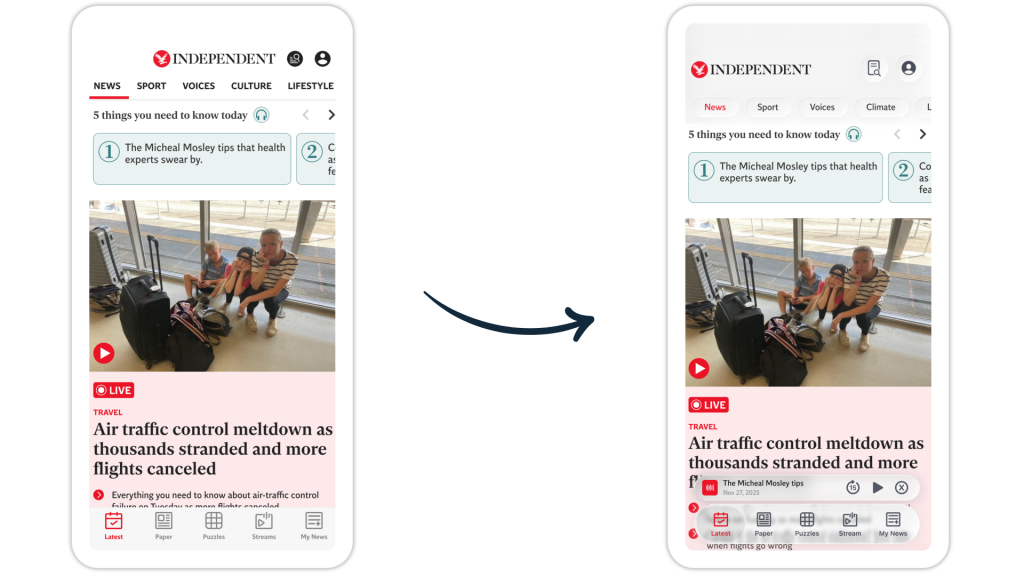
Apple’s Liquid Glass is the biggest design shift iOS has seen in years, and we’ve made sure Bolt is ready for it. From Bolt 5.0 onwards, your app will automatically pick up the new Liquid Glass aesthetic as part of your standard updates. No extra work needed on your end.
The new look rolls out across key interface elements including tab bars, navigation bars, toolbars and settings screens, all out of the box. And the good news is that most of your branding will carry over. Colours, typography and iconography are all still supported. The main thing to be aware of is that bar colours won’t be individually brandable under Liquid Glass, as the design language takes care of those itself to keep things visually consistent.
More custom screens like your subscription flow or audio player will stay largely as they are, but they’ll still feel cohesive within the new aesthetic, so the overall experience holds together really nicely.
Check out our Liquid Glass doc for more info.
Who’s affected: All iOS publishers who may want to review how their colours and icons translate to the new design language.
What you need to do: Update to Bolt 5.0 once available and reach out to your CSM with any questions around styling.
Useful for: Your subscriptions and editorial teams
iOS and Android publishers have been able to lock individual articles to specific subscriber tiers for a while now. We’re pleased to say that same control has now landed on Web too, so you can manage article-level access consistently across every platform in one go.
Who’s affected: Customers who have web enabled and want to gate content at the article level, particularly those with metered or tiered subscription models.
What you need to do: Reach out to Support for configuration.
Useful for: your product team
We’ve made a couple of handy improvements to how your app settings work. You can now configure items to show or hide based on whether a user is signed in, so things like account options only appear when they’re actually relevant. You can also break the account settings section into individual components and reorder or hide them as you like. This gives you more control and less clutter.
Who’s affected: Customers who have different settings experiences for logged-in vs logged-out users, or who want more granular control over what appears in their app’s account section.
What you need to do: Reach out to Support for an app update, to iOS 4.19.2 and Android 4.17.0, and for configuration.
Useful for: Your ad and revenue teams
You can now set a custom time window between ad displays for interstitials, prestitials and splash screens. It’s a small change that makes a real difference, giving you the flexibility to find the right balance between ad revenue and an engaging reading experience for your users.
Who’s affected: Customers running interstitials, prestitials or splash screen ads who want to manage ad frequency to protect user experience.
What you need to do: Reach out to Support for an app update, to iOS 4.20.0 and Android 4.17.0, and for configuration.
Good news if you’re using OneSignal for push notifications. Bolt now supports sending in-app events directly to OneSignal, giving you richer behavioural data to sharpen your messaging and segmentation. You’ll need a compatible OneSignal plan to unlock it, but everything on the Bolt side is already in place.
Who’s affected: Customers using OneSignal for push notifications who want to use in-app behaviour to inform their messaging strategy.
What you need to do: Reach out to Support for an app update, to iOS 4.20.1 and Android 4.17.0.
Useful for: Your product and editorial teams
If you’re looking for a cleaner way to organise busy timelines, second-level navigation lets you group related content under a broader top-level category without losing the more detailed filters underneath.
So, for example, timelines for football, athletics, rugby and hockey could all sit under Sport, while still giving users an easy way to drill down to the content they want. Both levels can be styled independently to match your brand. On Bolt Web, the feature uses a clean dropdown for a smooth experience.
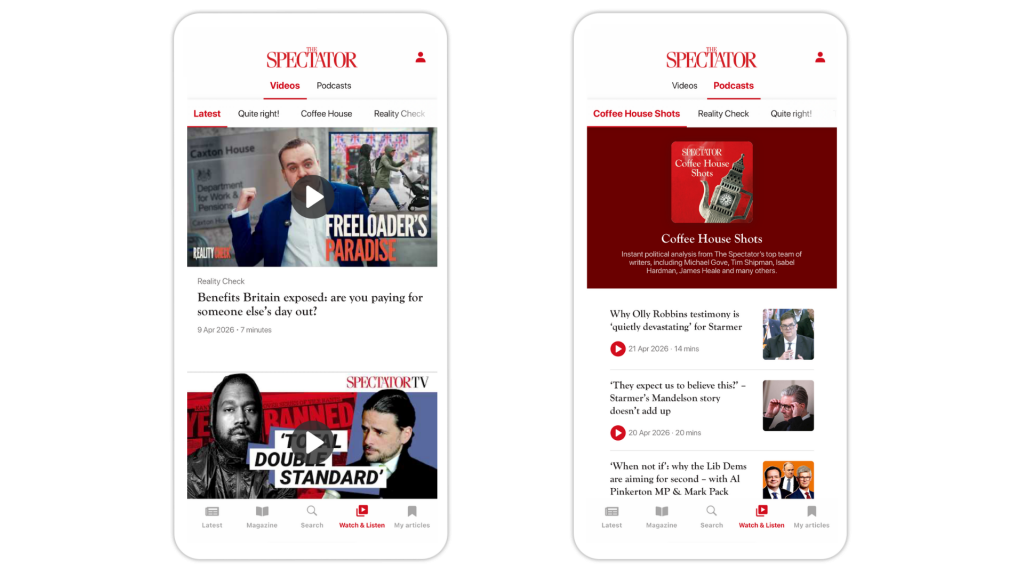
If you’d like to explore second-level navigation for your app or website, reach out to Support or contact your customer success manager to get it set up.
Previously only available on Substack, the Bulwark launched its first, fully-owned app on Pugpig Bolt, giving its growing audience a fully branded place to read, watch and listen. Articles, podcasts, video and commenting now live together in one focused experience, designed to build daily habit. Get the full rundown on the launch here.
By popular demand from its audience, Engelsberg Ideas launched a new app on Pugpig Bolt, expanding its website experience into a new mobile-first format. The app creates a new space for Engelsberg’s audience to engage with essays, podcasts and long-form ideas on the go. Catch up on the launch here.
JFM, Denmark’s second largest regional media group, rolled out 16 titles on Bolt, bringing personalisation, seamless audio, podcasts and live sport into a single mobile experience built around daily reader habit. This is a great example of our Multi-App Manager in action, letting publishers build, iterate on and launch large numbers of apps from one central hub. Full info here.
Our second Danish launch in the space of a month! Another of Denmark’s largest regional publishers, Det Nordjyske Mediehus, launched a new mobile app for its Nordjyske title on Pugpig Bolt. Previously split across two platforms, vertical video, podcasts, live news and personalised timelines now live together in one place, bringing Nordjyske’s journalism into a single habit-building mobile experience. More info on the launch here.
In a recent Media Bulletin, we explored how publisher apps are starting to play a bigger role in acquisition, not just retention. With in-app revenue rising and engagement at its highest, we unpack how publishers are moving apps up the funnel and converting engaged readers into paying subscribers. Read the full Bulletin here.
Our latest look at vertical video explores why it’s starting to feel much less like a social add-on and much more like a core publisher product. As publishers like The Economist bring it into owned apps more deliberately, we look at what that means for engagement, subscriber value and app strategy. Catch up on the full article here.
If you’re not already part of Mobile Matters, now’s a great time to get involved. It’s a community built for publishers and media professionals to connect, share what’s working (and what isn’t), and stay on top of the latest trends in mobile. We’d love to see you in there! Click here to join.
And there we have it! Take a look at all Bolt product release notes for more details. And if you’re a customer, don’t forget to reach out to your Customer Success Manager if you’d like help implementing anything featured here. If you’d like a demo of our mobile app platform, you can reach out to our team. We also send these product updates out in an email newsletter – get in touch if you don’t receive it and would like to.
News
News
News
News